


In 2024, most universities were still debating whether to ban ChatGPT. By mid-2025, the conversation had completely flipped. Stanford, MIT, Oxford and hundreds of other institutions began integrating AI tools into their curricula — because students who used AI effectively were outperforming those who didn’t. Not because the AI was doing their work for them, but because it was handling the mechanical parts of studying and freeing up time for actual understanding.
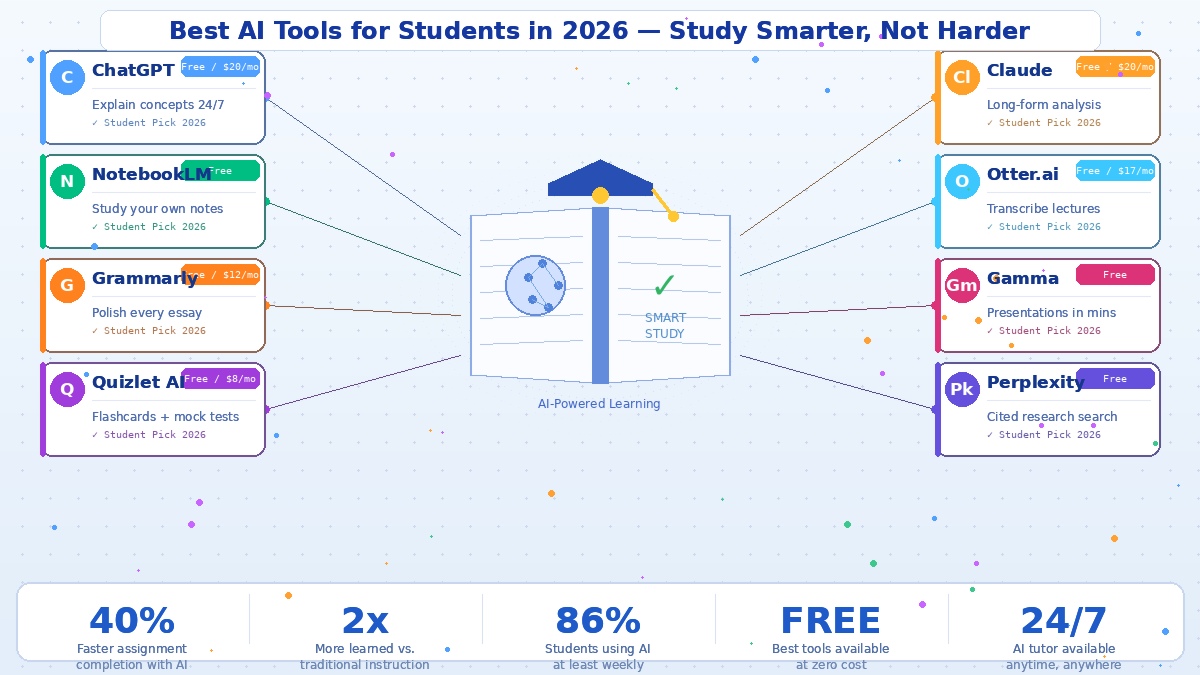
Students who use AI tools effectively now complete assignments 40% faster while scoring the same or higher than those who don’t. A Harvard study cited across the education technology community found that AI tutoring built on active learning principles helped students learn twice as much in less time compared to traditional classroom instruction.
The tools have also become remarkably accessible. As of 2026, the competition among AI companies for student users has pushed free tiers to their highest-value point ever. Most of what you need costs nothing.
Here’s what’s worth using.
ChatGPT — The One That Does Everything
ChatGPT remains the most versatile AI study tool available. It runs on GPT-4o by default in 2026, handles text, images and file uploads, and can explain a complex concept, generate practice questions, outline an essay, debug code, and walk through a maths problem all in a single conversation. The free tier is genuinely useful. The $20/month Plus plan unlocks faster responses, Deep Research mode, and advanced voice conversations.
The key is in how you use it. Instead of asking “write me an essay about the French Revolution,” ask it to explain the causes as if you’re 16, then generate five exam questions, then challenge your draft paragraph by paragraph. That’s active learning — and it produces results.
NotebookLM — Study Your Own Materials
Google’s NotebookLM is the tool most students haven’t discovered yet and probably should. You upload your own documents — lecture notes, textbook chapters, research papers, PDFs — and then ask questions of them directly. Every answer comes from your specific sources, not the general internet. Ask “summarise Chapter 4” or “explain this theory in simple terms” and it responds based on what you actually uploaded.
It now also generates audio overviews — a two-person podcast-style discussion of your notes — which is useful for auditory learners who want to review material without staring at a screen. It’s completely free.
Grammarly — More Than a Spellchecker Now
The 2025-26 AI upgrades turned Grammarly from a grammar checker into a genuine writing coach. It catches grammar errors in real time, suggests structural improvements, adjusts tone for academic contexts, and checks for plagiarism. For anyone writing essays under pressure, it catches the mistakes you stop seeing after reading your own draft three times. The free tier covers the basics. The $12/month Premium plan adds style suggestions and full-document rewrites.
Quizlet AI — Flashcards That Actually Work
Quizlet has matured significantly. Its Q-Chat tutor now asks you questions in a conversational format rather than just flipping cards, and the AI-generated practice tests simulate exam conditions based on your study sets. The Learn mode identifies your weak points and resurfaces the material you keep getting wrong. Research consistently shows that students who self-test significantly outperform those who simply re-read their notes — and Quizlet is the easiest way to build that habit.
Claude — For the Heavy Analytical Work
Where ChatGPT is fast and versatile, Claude goes deep. Its 200,000-token context window means you can paste in an entire academic paper, a legal case study, or a dense chapter and have a genuine analytical conversation about it. Students in philosophy, literature, law, and any subject requiring careful argumentation consistently report that Claude produces more thoughtful, structured responses. For long essays and detailed analysis, it’s worth trying alongside ChatGPT rather than instead of it.
Otter.ai — Never Miss a Lecture Again
Otter.ai records and transcribes lectures in real time, generating summaries and identifying key points automatically. If you’re the kind of person who can’t write notes and listen simultaneously — which is most people — Otter removes the problem entirely. You attend, you listen, and you have a full searchable transcript waiting for you after class. The free tier gives 600 minutes of transcription per month. The paid plan starts at $17/month for unlimited minutes.
Gamma — Presentations Without the Pain
Every student has spent three hours on a presentation that should have taken thirty minutes. Gamma takes your notes or a rough outline and generates a polished presentation — slides, content, and visuals — that looks genuinely professional. It’s not the same as designing something from scratch, but for most academic presentations it’s more than good enough. It’s free for basic use.
Perplexity — Research With Sources Attached
For academic research, Perplexity fills a specific gap that ChatGPT doesn’t. Every answer cites its sources. Every claim is linked back to where it came from. For students who need to verify information, build reference lists, or understand which sources are actually saying what, that transparency is enormously useful. The free tier covers most student needs.
One Rule That Makes All of This Actually Work
The students who benefit most from AI tools treat them as thinking partners rather than answer machines. If the AI is producing the output and you’re just copying it, you’re not learning. If the AI is helping you engage more deeply with material you’ve already started wrestling with, you are. That distinction — between using AI to skip the work and using it to do the work better — is the difference between falling behind and genuinely getting ahead.


