



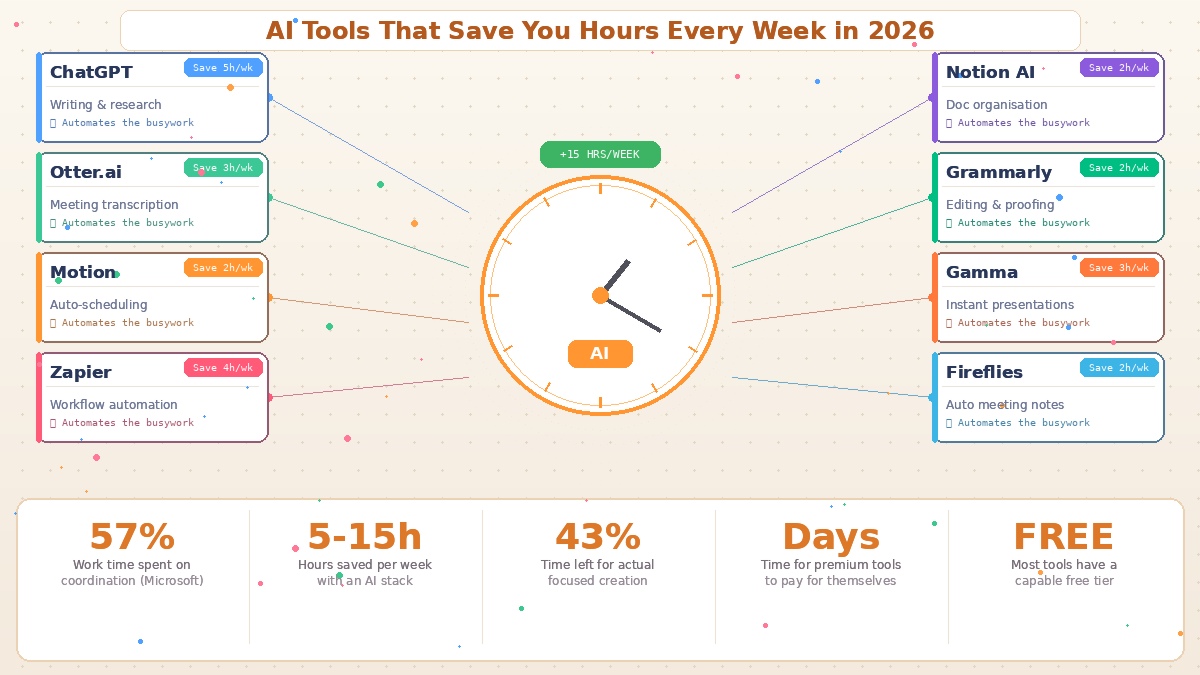
Here’s a number that should bother you: a 2025 Microsoft study found that the average knowledge worker spends 57% of their time on communication and coordination — meetings, emails, chat messages, status updates. Only 43% goes to what Microsoft calls “focused creation,” the deep work that actually produces results.
Think about what that means. More than half your week is spent on things that aren’t the work itself. They’re the scaffolding around the work — necessary, but not where the value gets created. And that’s exactly the territory where AI tools earn their keep. Not by doing your job, but by clearing away the busywork that surrounds it.
The realistic time savings for most professionals range from five to fifteen hours per week, depending on how much of their role involves coordination. Here are the tools that actually deliver that.
ChatGPT — The All-Purpose Time Saver
It’s the obvious one, but it earns its place. ChatGPT collapses tasks that used to eat entire afternoons. Drafting a first version of a report, summarising a long document, restructuring a messy email, brainstorming options, debugging a formula — these are the things that quietly consume hours. ChatGPT doesn’t produce a final product you can use blindly, but it gets you 80% of the way there in seconds, leaving you to refine rather than start from a blank page. For most professionals, that alone is the single biggest weekly time saving available. The free tier covers most needs; Plus is $20/month.
Otter.ai — Stop Taking Meeting Notes
Meeting transcription is one of the clearest time wins available. Otter.ai records and transcribes meetings in real time, generates summaries, and identifies action items automatically. The deeper benefit isn’t just the saved note-taking time — it’s that you can actually pay attention during the meeting instead of splitting your focus between listening and writing. For anyone in three or more meetings a day, this saves roughly three hours a week and improves the quality of the meetings themselves. The free tier covers 600 minutes a month.
Motion — Let AI Run Your Calendar
Scheduling is a surprisingly large hidden time sink. Motion uses AI to automatically plan your day — prioritising tasks, scheduling meetings, and reorganising your calendar when something changes. Instead of manually shuffling your to-do list every time a meeting moves or a new priority lands, Motion handles the constant rebalancing for you. For people who struggle with time management or whose days get repeatedly disrupted, it removes the daily friction of figuring out what to work on next. Plans start around $19/month.
Zapier — Automate the Repetitive Stuff
Zapier connects the apps you already use and automates the handoffs between them. When a form gets filled out, automatically create a task, send a Slack notification, and add a row to a spreadsheet — without you touching anything. The tasks Zapier eliminates are individually small but collectively enormous: the copying, pasting, forwarding, and updating that happens dozens of times a day. For anyone whose work involves moving information between tools, Zapier can save four or more hours a week. There’s a free tier for basic automations.
Notion AI — Organise Without the Overhead
Notion AI handles the organisation and retrieval of information that piles up across documents, notes, and projects. It can summarise long documents, answer questions about your own content, and generate structured drafts from rough notes. For knowledge workers who accumulate large amounts of written material, the time spent searching for and reorganising information adds up fast — Notion AI cuts it down meaningfully.
Grammarly — Edit at Speed
Grammarly’s 2026 upgrades made it more than a spellchecker — it now suggests clarity improvements, tone adjustments, and structural edits in real time. The time saving isn’t dramatic on any single email, but across a week of writing it adds up to a couple of hours, and the consistency improvement means less back-and-forth from misunderstood messages. The free tier handles grammar and spelling; Premium adds the deeper editing.
Gamma — Presentations Without the Pain
Building a presentation from scratch can eat an entire afternoon. Gamma takes a rough outline or a document and generates a polished, professional presentation automatically. You refine rather than design. For anyone who regularly needs to communicate ideas visually but isn’t a trained designer, this is one of the most satisfying time savings on the list — three hours of slide-wrangling reduced to thirty minutes of review. It’s free for basic use.
Fireflies — Meeting Notes on Autopilot
Like Otter, Fireflies automatically records, transcribes, and summarises meetings — but it leans toward integration with your broader workflow, automatically pushing notes and action items into your CRM, project tools, and team channels. For teams where meeting outcomes need to flow into other systems, Fireflies removes the manual step of distributing notes after every call.
The Smart Way to Build Your Stack
The mistake most people make is trying every tool at once. The tools that actually stick are the ones that solve a problem you genuinely have. The smart approach is to build a small stack: one tool for writing, one for meetings, one for scheduling, one for automation. Master those, then add more only when a clear friction point emerges.
Start by paying attention to where your time actually goes for a week. You’ll probably find it’s not the work you think — it’s the coordination around it. That’s the 57% Microsoft identified, and that’s exactly where these tools shift the balance back in your favour.
The professionals pulling ahead in 2026 aren’t working more hours. They’ve just stopped spending those hours on things a tool can handle. Every hour you save formatting notes or writing the fifteenth scheduling email of the day is an hour you get back for the work that actually moves the needle.


