


Here’s the honest version of the developer laptop conversation: marketing specs mean almost nothing until you put a real workflow on a machine. A laptop that handles a React project and four browser tabs smoothly can buckle the moment you add Docker, a local database, an AI assistant running in the background, and Slack on a video call. That’s not an unusual day for a developer in 2026 — it’s a typical Tuesday.
Global PC shipments hit a record 270 million units in 2025, which means there are more options than ever — and more ways to buy the wrong one. Here’s what actually holds up when you throw real development work at it.
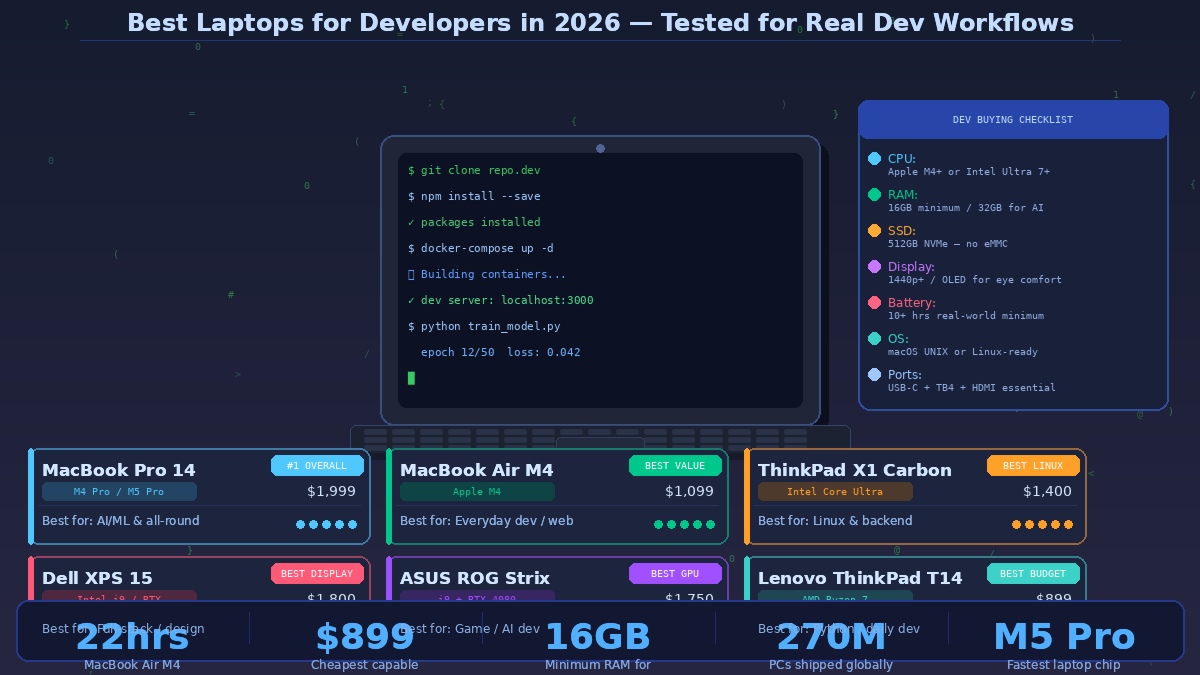
MacBook Pro 14-inch (M4 Pro / M5 Pro) — Best Overall
The MacBook Pro 14 remains the benchmark that every other developer laptop gets measured against. The M4 Pro chip compiles codebases fast enough that you genuinely notice the difference compared to anything else at the same price. The M5 Pro model, released in early 2025, pushed single-core and multi-core performance further still, and is the chip of choice for AI/ML engineers running local model inference.
Testing from Creative Bloq confirmed battery life that tracks Apple’s claimed 22-hour figure remarkably closely in real-world conditions — which matters enormously if you work from cafés, trains, or anywhere without reliable power access. The 14-inch Liquid Retina XDR display renders code clearly and comfortably for long sessions. Port selection — MagSafe, three Thunderbolt 4, HDMI, and SD card — is genuinely generous for a machine this compact.
The caveat is real: macOS won’t run some enterprise tools and Windows-native development environments. For web, mobile, backend, Python, and machine learning developers, this is rarely a problem. For .NET developers or anyone deep in Microsoft’s ecosystem, it can be a dealbreaker. Prices start at $1,999.
MacBook Air 15-inch (M4) — Best Value for Most Developers
If the Pro’s price is hard to justify, the MacBook Air M4 covers the vast majority of developer needs at $1,099. The M4 chip handles simultaneous IDEs, browser tabs, local servers, and light compiling without complaint. Battery life reaches 18 hours in realistic use. It runs silent — no fan — which makes it genuinely pleasant to use in quiet environments.
The difference from the Pro is felt mainly during prolonged compilation of large codebases, intensive ML training, or running multiple Docker containers at once. For most web, app, and backend developers who aren’t pushing GPU workloads, the Air is the smarter purchase. PC Build Advisor named it the best coding laptop for developers who prioritise portability over raw workstation power in their 2026 guide.
Lenovo ThinkPad X1 Carbon Gen 13 — Best for Linux
TechRadar’s February 2026 update explicitly recommended the ThinkPad X1 Carbon for Java, .NET, backend, and Linux systems engineers — and the reasoning is straightforward. The ThinkPad keyboard remains the best typing experience on any laptop not made by Apple. The machine is certified for multiple Linux distributions out of the box, with excellent driver support that eliminates the driver headaches that still plague some competitors. It weighs under 1.1kg and runs on Intel Core Ultra processors that handle sustained workloads without thermal throttling.
For developers who live in the terminal, SSH into remote servers for most of their work, and want a machine that disappears into the background rather than demanding attention, the X1 Carbon is the professional’s professional choice. Prices start around $1,400.
Dell XPS 15 — Best Display for Full-Stack and Front-End
If your work involves visual output — UI design, front-end development, reviewing design assets — the Dell XPS 15’s OLED display is a genuine differentiator. Colour accuracy and contrast are exceptional, and the larger screen gives you the real estate to work comfortably across multiple panes. The Intel i9 processor with NVIDIA RTX graphics handles heavy compiling alongside GPU-accelerated tasks. The trade-off is battery life, which doesn’t match Apple’s silicon efficiency — you’ll want to stay near power for heavy workloads. Prices start around $1,800.
ASUS ROG Strix G18 — Best for Game Development and AI
Named the top developer laptop for intensive workloads by Eneba’s 2026 guide, the ROG Strix’s Intel i9 processor and RTX 4080 GPU combination handles game development, AI training, and large-scale compilation without breaking a sweat. Thermal performance is genuinely strong — it maintains peak performance under sustained load rather than throttling after ten minutes, which is where a lot of gaming-labelled laptops let developers down. The trade-off is size and weight; this is a desk machine that occasionally travels, not a commuter’s companion. Prices start around $1,750.
Lenovo ThinkPad T14 — Best Budget Pick
For developers who need something reliable, Linux-friendly, and professionally credible without spending close to $2,000, the ThinkPad T14 with AMD Ryzen 7 delivers. It handles the fundamentals of development — multiple IDEs, light Docker usage, browser tabs, local servers — with the ThinkPad keyboard quality that developers have trusted for decades. It won’t win benchmark contests, but it will show up every day and do the work without drama. Prices start around $899.
What Actually Matters When Choosing
Minimum 16GB of RAM — 32GB if you’re working with AI models, large Docker environments, or multiple virtual machines simultaneously. A fast NVMe SSD (avoid eMMC storage entirely). A 1440p or higher display you can look at for eight hours without eye strain. USB-C with Thunderbolt 4 support for external monitors and peripherals. And real battery life — not the manufacturer’s figure, but independently tested numbers under realistic workloads.
The Apple M-series chips have redefined what’s possible in a thin, fanless design. But the right laptop is the one that fits how you actually work — not the one with the most impressive spec sheet.


