Close Menu
TechZappi

    Subscribe to Updates

    Get the latest creative news from FooBar about art, design and business.

    What's Hot

    The Most Dangerous Malware Active Right Now – 2026 Report

    May 1, 2026

    The Best Password Managers of 2026 – Tested, Ranked, No Fluff

    May 1, 2026

    What Comes After the Internet We Know – The Web’s Next Chapter

    May 1, 2026
    Facebook X (Twitter) Instagram
    Facebook X (Twitter) Instagram Vimeo Pinterest YouTube
    TechZappi
    Subscribe Login
    • Home
    • AI

      8 AI Startups Quietly Reshaping the World in 2026

      April 22, 2026

      Beyond the Hype: How AI is Actually Changing Productivity, 2024 Edition

      April 16, 2026

      AI Is Already Changing the World – Here’s How It’s Actually Playing Out

      April 8, 2026

      The AI Tools Actually Worth Your Time in 2026

      April 1, 2026

      The Jobs AI Is Already Taking — And What’s Coming Next

      March 17, 2026
    • Technology
      1. AI
      2. Cybersecurity
      3. Crypto
      4. App
      5. Security
      6. View All

      8 AI Startups Quietly Reshaping the World in 2026

      April 22, 2026

      Beyond the Hype: How AI is Actually Changing Productivity, 2024 Edition

      April 16, 2026

      AI Is Already Changing the World – Here’s How It’s Actually Playing Out

      April 8, 2026

      The AI Tools Actually Worth Your Time in 2026

      April 1, 2026

      The Most Dangerous Malware Active Right Now – 2026 Report

      May 1, 2026

      Don’t Take the Bait – How to Spot and Stop Phishing Attacks in 2026

      April 22, 2026

      Your Bank Details Aren’t as Safe as You Think – Here’s How Hackers Get Them

      March 31, 2026

      They Stole Billions — The Cyber Attacks That Changed Everything

      March 25, 2026

      Robinhood Acquires Bitstamp for $200M to Bolster Crypto Presence

      July 18, 2024

      CoinDCX Expands Globally with Acquisition of BitOasis

      July 4, 2024

      IRS Finalizes New Regulations for Crypto Tax Reporting

      July 4, 2024

      EU Privacy Decision Looms for Worldcoin Amid Ongoing Controversy

      June 4, 2024

      The Best Antivirus Software in 2026 – Tested, Ranked, and Worth Your Money

      April 7, 2026

      Google Expands Gemini AI Across Docs, Sheets, Slides, and Drive

      March 10, 2026

      William Shatner Helps Launch X Money Beta With Charity Auction

      March 4, 2026

      Nearby Glasses App Warns You if Someone Close Is Wearing Smart Glasses

      March 2, 2026

      The Best Antivirus Software in 2026 – Tested, Ranked, and Worth Your Money

      April 7, 2026

      Kaspersky to Cease US Operations and Lay Off Employees Following Government Ban

      July 17, 2024

      Data Breach Exposes Millions of mSpy Customers’ Data

      July 12, 2024

      HealthEquity Describes Data Breach as an ‘Isolated Incident’

      July 4, 2024

      The Most Dangerous Malware Active Right Now – 2026 Report

      May 1, 2026

      The Best Password Managers of 2026 – Tested, Ranked, No Fluff

      May 1, 2026

      What Comes After the Internet We Know – The Web’s Next Chapter

      May 1, 2026

      Are Driverless Cars Actually Safe? The Data Says Yes – Mostly

      April 22, 2026
    • Contact
    TechZappi
    Home » The Best Password Managers of 2026 – Tested, Ranked, No Fluff
    Product Reviews

    The Best Password Managers of 2026 – Tested, Ranked, No Fluff

    May 1, 20265 Mins Read
    Facebook Twitter Pinterest LinkedIn Tumblr WhatsApp VKontakte Email
    Share
    Facebook Twitter LinkedIn Pinterest Email

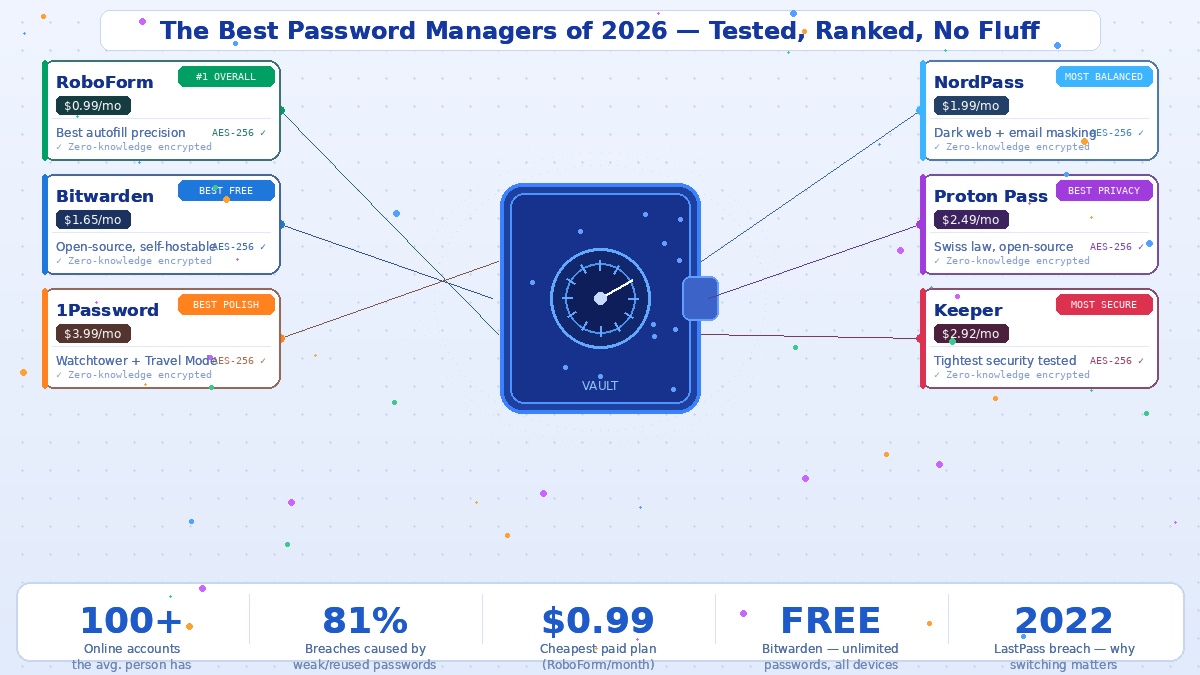
    Here’s a stat that should make you a little uncomfortable: the average person has over 100 online accounts. Nobody remembers 100 different passwords. So most people do the thing they know they shouldn’t — they reuse the same two or three passwords everywhere. And that single habit is responsible for 81% of hacking-related data breaches.

    Password managers solve this completely. They generate unique, complex passwords for every site, store them in an encrypted vault, and fill them in automatically when you log in. You remember one master password. Everything else is handled.

    The market shifted noticeably in early 2026 — Bitwarden doubled its premium price, 1Password raised its rates, and Dashlane killed its free plan entirely. Meanwhile, Proton Pass cut its price in half. Here’s where things stand after independent testing across desktop, mobile, and browser extensions.


    RoboForm — Best Overall

    Multiple independent rankings have landed on RoboForm as the top pick for 2026, and after hands-on testing the reason is clear: it’s fast, precise, and it actually fills forms properly — not just login boxes, but addresses, payment details, and custom fields. It supports one-click logins to desktop applications as well as websites, includes built-in TOTP authentication, and works smoothly across Windows, macOS, iOS, and Android. The pricing is exceptional — Premium starts at just $0.99 per month on a long-term plan, with a Family plan covering five users from $1.59 per month. There’s a free tier for single-device use if you want to try before committing.


    Bitwarden — Best Free Option

    Bitwarden is the only password manager that gives you genuinely unlimited passwords across unlimited devices for free. No device cap, no password limit, no time limit — it’s free indefinitely. The premium plan adds advanced two-factor authentication options, encrypted file attachments, and detailed security reports for $19.80 per year following a January 2026 price increase. It’s fully open-source, has been audited by independent security firms, and uniquely allows self-hosting — meaning you can run the entire vault on your own server if you want complete control over your data. The interface is a little more functional than beautiful, but that’s a fair trade for what you get at the price.


    1Password — Best for Daily Use and Families

    1Password has the most polished experience of any manager on this list. Its Watchtower feature constantly monitors your stored credentials against known breach databases and flags anything compromised. The travel mode is genuinely unique — it temporarily removes selected vaults from your device when crossing borders, protecting sensitive data from device inspections. Pricing increased to $3.99 per month in March 2026, making it the most expensive personal option, and there’s no free tier — only a 14-day trial. If price is a priority, look elsewhere. If experience is what matters, nothing beats it.


    NordPass — Most Balanced

    TechRadar named NordPass the best password manager for most people in 2026, and it earns that. Dark web monitoring alerts you when your email or credentials appear in leaked data. Email masking lets you create alias addresses to protect your real inbox. The interface is clean and intuitive across all platforms — Windows, macOS, Linux, iOS, Android, and every major browser. Premium starts at around $1.99 per month. It’s the easiest recommendation for someone who wants everything to just work without overthinking the options.


    Proton Pass — Best for Privacy

    Proton Pass is built by the team behind ProtonMail, the encrypted email service used by journalists and activists worldwide. It operates under Swiss privacy law, its code is entirely open-source — meaning anyone can audit it at any time — and it submits to regular third-party security audits. It includes built-in email alias generation, meaning you can sign up for websites using a masked address rather than your real one. The Pass Plus plan dropped to $2.49 per month in 2026 as Proton cut prices to compete. For privacy-focused users, it’s the clear choice.


    Keeper — Most Secure

    Keeper consistently scores highest on security-specific testing. It uses zero-knowledge architecture, never has had a data breach, and supports the widest range of two-factor authentication methods of any manager tested. It’s not cheap — plans start around $2.92 per month — and some advanced features like dark web monitoring and secure file storage cost extra. But for anyone whose primary concern is security over everything else, no manager has a better record.


    What About Your Browser’s Built-In Manager?

    Chrome, Safari, and Firefox all offer built-in password storage, and they’re better than nothing. But they lack cross-browser support, secure sharing with others, breach monitoring, emergency access for family members, and the ability to store things like secure notes and payment details in an organised way. They’re a starting point, not a solution.

    The LastPass breach in 2022 — where encrypted vault data was stolen from millions of users — remains the most important cautionary tale in this space. Encrypted vault data is still out there. If you used LastPass before 2022, change your passwords and switch. The good news is that all six options above use the same zero-knowledge encryption that means even the provider can’t read your vault — the differentiator is everything else on top of that foundation.

    Product Reviews
    Share. Facebook Twitter Pinterest LinkedIn Tumblr WhatsApp Email
    Previous ArticleWhat Comes After the Internet We Know – The Web’s Next Chapter
    Next Article The Most Dangerous Malware Active Right Now – 2026 Report
    admin
    • Website

    Related Posts

    The Most Dangerous Malware Active Right Now – 2026 Report

    May 1, 2026

    What Comes After the Internet We Know – The Web’s Next Chapter

    May 1, 2026

    Are Driverless Cars Actually Safe? The Data Says Yes – Mostly

    April 22, 2026

    8 AI Startups Quietly Reshaping the World in 2026

    April 22, 2026
    Leave A Reply Cancel Reply

    Our Picks

    The Most Dangerous Malware Active Right Now – 2026 Report

    May 1, 2026

    Are Driverless Cars Actually Safe? The Data Says Yes – Mostly

    April 22, 2026

    8 AI Startups Quietly Reshaping the World in 2026

    April 22, 2026

    Don’t Take the Bait – How to Spot and Stop Phishing Attacks in 2026

    April 22, 2026
    • Facebook
    • Twitter
    • Pinterest
    • Instagram
    • YouTube
    • Vimeo
    Don't Miss
    Cybersecurity

    The Most Dangerous Malware Active Right Now – 2026 Report

    May 1, 2026

    The threat landscape in 2026 looks nothing like it did five years ago. The amateur…

    The Best Password Managers of 2026 – Tested, Ranked, No Fluff

    May 1, 2026

    What Comes After the Internet We Know – The Web’s Next Chapter

    May 1, 2026

    Are Driverless Cars Actually Safe? The Data Says Yes – Mostly

    April 22, 2026

    Subscribe to Updates

    Get the latest creative news from SmartMag about art & design.

      About Us
      About Us

      TechZappi is your go-to source for the latest tech news, digital trends, and innovation stories. We cover topics ranging from AI and apps to cybersecurity and online tools, helping readers stay informed about what’s happening in the technology world.

      Our Picks

      The Most Dangerous Malware Active Right Now – 2026 Report

      May 1, 2026

      8 AI Startups Quietly Reshaping the World in 2026

      April 22, 2026

      Don’t Take the Bait – How to Spot and Stop Phishing Attacks in 2026

      April 22, 2026

      Subscribe to Updates

      Get the latest creative news from Techzappi about Ai, Apps and Cybersecurity.

        Facebook X (Twitter) Instagram Pinterest Vimeo YouTube
        • Home
        • AI
        • App
        • Cybersecurity
        © 2026 TechZappi. All Rights Reserved.

        Type above and press Enter to search. Press Esc to cancel.

        Sign In or Register

        Welcome Back!

        Login to your account below.

        Lost password?