
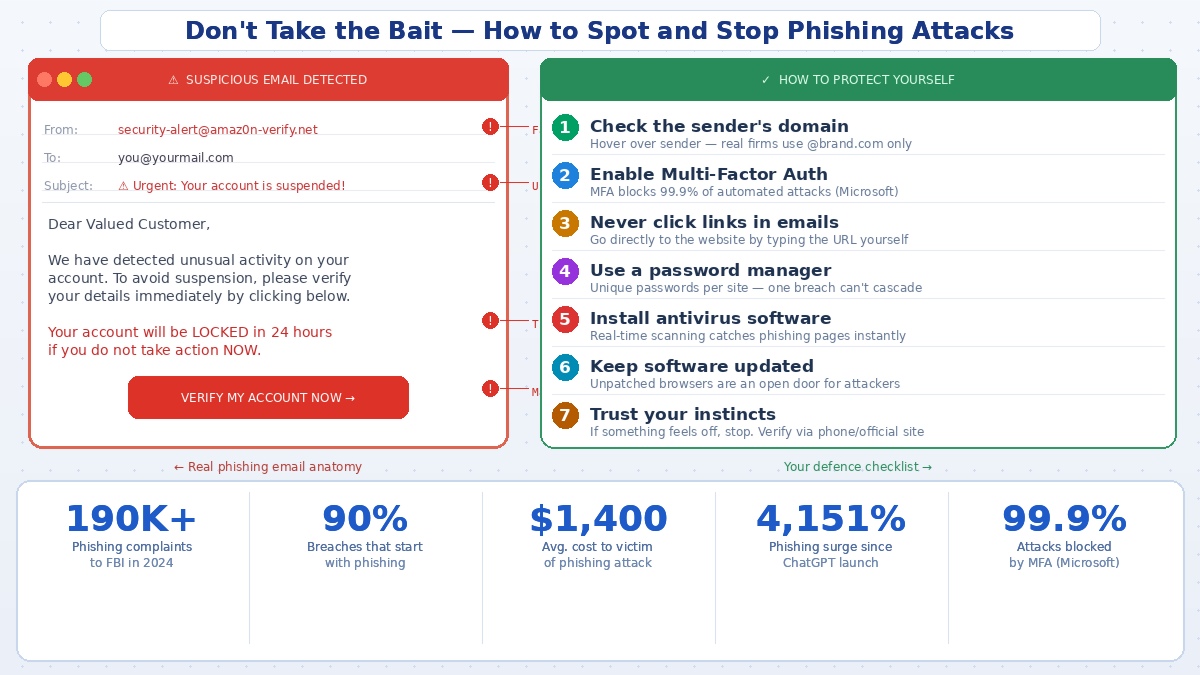
Phishing is the most reported cybercrime in the world. The FBI received over 190,000 phishing complaints in 2024 alone. And the scary part isn’t the volume — it’s that the attacks themselves have become dramatically more convincing.
The old advice of “look for typos and bad grammar” is now genuinely dangerous. AI-generated phishing messages are fluent, personalised, and indistinguishable from the real thing to most people. A 2025 Gmail phishing campaign sent emails that appeared to come directly from no-reply@google.com, complete with fake legal subpoena notices hosted on actual Google Sites pages. People with years of security experience got fooled.
Over 90% of all data breaches start with a phishing attack. The average cost to an individual victim is $1,400. The good news is that the defences — when you actually apply them — are highly effective. Here’s what actually works.
Know What You’re Actually Looking For
Modern phishing doesn’t arrive as a desperate email from a stranger. It arrives as your bank, your HR department, Amazon, Netflix, or Microsoft. The message typically contains some kind of urgency — your account will be locked, a payment has failed, your password has expired — designed to make you act before you think.
The most important thing to check is the sender’s domain, not their display name. The display name can say “Apple Support” while the actual address is something like security@appl3-verify.net. Always hover over the sender’s name to see the real address underneath. Legitimate companies use their own domain — and only their own domain.
Turn On Multi-Factor Authentication — Right Now
This is the single most effective thing you can do. Microsoft’s research found that multi-factor authentication blocks 99.9% of automated account attacks. Even if a hacker gets your password through phishing, MFA means they still can’t get into your account without access to your phone or authentication app.
Enable it on your email first — that’s the account criminals want most, because it resets everything else. Then your bank, your social media, and anything with financial or personal data attached to it.
Never Click Links in Emails or Text Messages
This one is simple and non-negotiable. If you receive an email from your bank saying something needs urgent attention, don’t click the link. Open your browser, type your bank’s address directly, and log in from there. The same applies to texts.
Phishing links are now built to pass through security filters, using redirect chains that mask the final destination. The link you see and the site you land on can be completely different URLs. The safest habit is to never let an email be the navigation tool you use.
Use a Password Manager With Unique Passwords
If you reuse passwords, a single successful phishing attack can unlock dozens of accounts. Password managers generate and store unique, complex passwords for every site — so a breach on one account goes nowhere.
There’s also a secondary benefit: reputable password managers won’t autofill your credentials on fake websites. If you’re on a convincing phishing clone of your bank’s login page, your password manager won’t recognise it and will refuse to fill in anything. That’s a quiet but powerful signal that something is wrong.
Keep Everything Updated
Phishing doesn’t always rely on you clicking a malicious link. Some attacks exploit vulnerabilities in outdated browsers or software to install malware without any interaction beyond visiting a page. That fake “urgent Chrome update” pop-up, the suspicious PDF reader prompt — these are delivery mechanisms for keyloggers and credential stealers.
Updates patch the vulnerabilities these attacks rely on. The annoyance of restarting your browser is considerably less than the annoyance of having your bank account emptied.
What to Do If You’ve Already Clicked
Speed matters. If you clicked a link and entered credentials, change that password immediately — and on every other account where you used the same one. Enable MFA if it isn’t already on. If financial information was entered, contact your bank directly using the number on the back of your card.
Don’t wait to see if anything happens. By the time stolen credentials are used, they’ve often already been sold to other criminals on dark web markets.
The Bottom Line
Phishing attacks have grown 4,151% since ChatGPT launched, because AI makes it easy to generate convincing, personalised scam messages at industrial scale. The fundamentals of defence haven’t changed, but they need to actually be in place — MFA, unique passwords, direct URL navigation, and a healthy suspicion of any message that creates urgency.
The best protection isn’t a tool. It’s the habit of pausing for two seconds before you act.
