Here’s something the productivity app industry doesn’t want you to realise: most people would be significantly more productive with four apps they actually use than with twenty apps they keep meaning to set up properly.
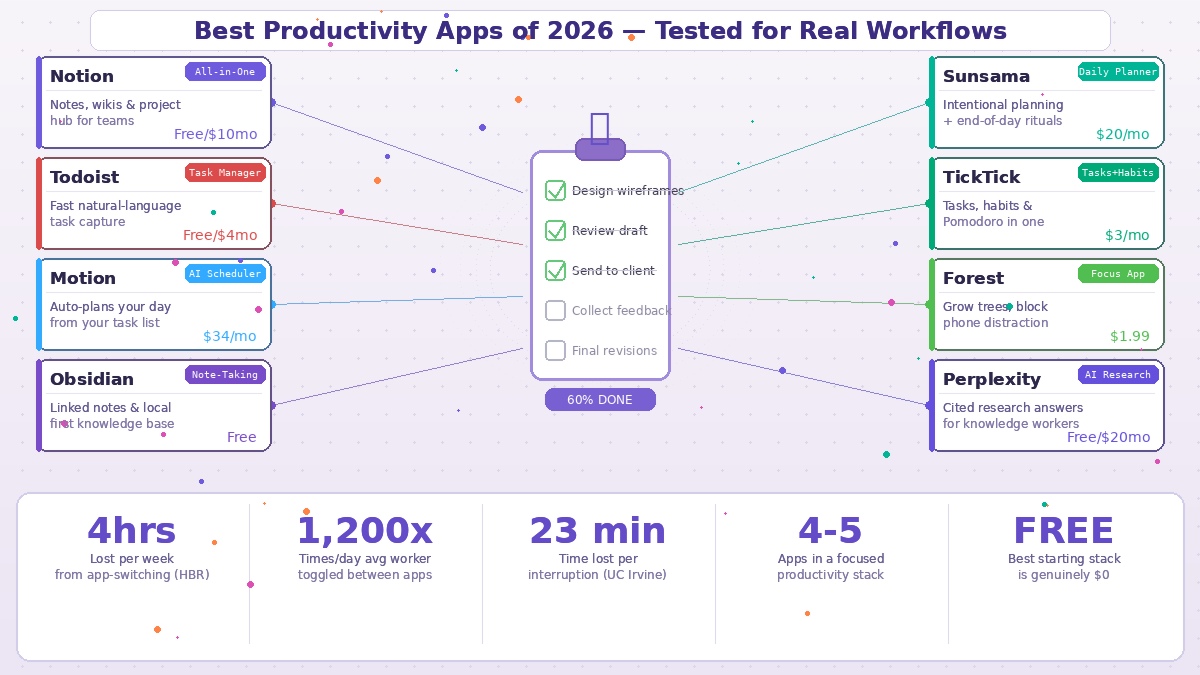
Research published by Harvard Business Review found that digital workers lose almost four hours a week reorienting after switching between applications, toggling between tools nearly 1,200 times per day. Research from UC Irvine puts the average cost of a single interruption at 23 minutes to fully refocus. The productivity apps that genuinely help aren’t the ones with the most features. They’re the ones that create the least friction and handle your actual shape of work.
This list is organised around that principle: match the tool to the job it’s actually good at.
Notion — Best All-in-One Workspace
Notion remains the most versatile productivity tool available for knowledge workers in 2026. Its 2026 updates introduced AI agents that can run autonomously — summarising documents, filing information into databases, and triggering workflows in the background. For individuals, the free tier covers almost everything. For teams, the collaborative workspace, wiki functionality, linked databases, and project management tools justify the $10/month per person.
The honest caveat: Notion has no native scheduling or auto-prioritisation engine. It’s exceptional at organising and storing information, but it doesn’t tell you what to work on next or protect your deep work time. Most serious Notion users pair it with a dedicated task manager and calendar. Treat Notion as your brain — the place where everything gets recorded and connected — not as your daily planner.
Todoist — Best Pure Task Manager
If you’ve tested task managers and always end up going back to a simple list, Todoist is the answer. Every independent test in 2026 across six weeks of real use lands on the same conclusion: it stays simple, it works reliably, and it never makes task capture feel like a chore.
Type “finish the client report tomorrow at 10am” and Todoist schedules it with a deadline and reminder automatically. The natural language input is the best in the category. Cross-platform sync works without fuss. Over 80 integrations connect it to everything else in your stack. The free plan handles personal use well. Pro at $4/month adds reminders and unlimited projects for anyone managing more than a handful of active workstreams.
Motion — Best for AI-Powered Scheduling
Motion is built around one idea: you shouldn’t have to decide what to work on today. You tell it your tasks, their deadlines, and their time estimates. Motion’s AI builds your schedule automatically and rebuilds it every time something changes — a meeting runs long, a task gets added, a deadline shifts. It integrates your calendar with your task list, so meetings and focus blocks live in one coherent view.
At $34/month it’s the most expensive app on this list, but for anyone who spends significant mental energy every morning figuring out what to do, the automation is genuinely liberating. For pure deadline-based autonomous scheduling, it’s the 2026 benchmark.
Obsidian — Best Note-Taking for Knowledge Workers
Obsidian takes a different philosophy from most note-taking apps: your notes are plain text files stored on your own device, not in someone else’s cloud. You pay nothing for the core app, it works offline, and your knowledge base is entirely yours — no subscription lock-in, no server shutdowns that destroy years of notes.
The killer feature is linked thinking. Every note can link to any other note, and Obsidian visualises those connections as a graph you can explore. For writers, researchers, and anyone building a personal knowledge system over years, this creates something genuinely valuable: a searchable, connected network of ideas rather than a pile of unrelated documents. The sync add-on costs extra, but for local-first knowledge management, the free tier is genuinely feature-complete.
Sunsama — Best for Intentional Daily Planning
Sunsama is the most opinionated app on this list, and that’s exactly the point. It’s designed around a daily planning ritual: each morning you pull in tasks from your connected tools, assign realistic time estimates, and Sunsama gently tells you when you’ve planned too much. At the end of the day, a shutdown ritual helps you reflect, close out what’s done, and disengage from work properly.
If you chronically overcommit and end every day feeling like you’ve failed, Sunsama’s constraint on what you’ll actually attempt is more useful than any feature-rich planning system. At $20/month it’s the most premium individual planning tool in the category, but the reviewers who love it consistently say it changed how they relate to their workday rather than just how they managed their tasks.
TickTick — Best Budget All-in-One
At around $3/month, TickTick is the most feature-dense affordable tool available. Tasks, habit tracking, multiple calendar views, and a built-in Pomodoro timer that many users pay separately for in other apps — all in one subscription. The design feels slightly dated compared to modern alternatives, but the sheer breadth of functionality at the price point is genuinely impressive. The free tier gives you nine lists and 99 tasks with no time limit.
Forest — Best Focus App
Forest is a focus timer with one clever twist: when you start a session, you plant a virtual tree. If you leave the app to check your phone, the tree dies. If you stay focused, your forest grows. That emotional cost — the visual record of killed trees — creates just enough friction to override the phone-checking impulse.
Real trees are planted through a partnership with a tree-planting organisation for every session completed. The one-time purchase costs around $1.99 on iOS and Android. For anyone who genuinely struggles with phone distraction during focused work, the gamification mechanic works when other approaches don’t.
Perplexity — Best AI Research Tool
Perplexity has established itself in 2026 as the research tool of choice for knowledge workers who need cited, verifiable answers rather than confident hallucinations. Every response links to its sources. Every claim is attributable. For market research, competitive analysis, due diligence, or any task requiring reliable information rather than creative generation, this is what distinguishes Perplexity from the general-purpose AI tools.
The free tier handles most personal research needs. Pro at $20/month adds higher daily query limits and advanced model access.
Building Your Stack
The most effective productivity setup in 2026 combines a small number of tools that each handle one job clearly: a place where tasks live (Todoist), a place where knowledge lives (Notion or Obsidian), something that manages your time (your calendar, Motion, or Sunsama), and one AI assistant for the cognitive work that doesn’t fit anywhere else (ChatGPT or Claude).
If budget is a constraint, the entirely free version of this stack — Notion for knowledge, Microsoft To Do for tasks, Google Calendar for time, Obsidian for connected notes — covers all the fundamentals without paying a monthly fee. The key insight from every serious productivity review in 2026 is the same: the professionals getting the most done aren’t using more tools. They’re using fewer, better, and consistently.
