Cloud storage used to be simple: whoever gave you the most gigabytes for the least money won. That’s no longer how it works. In 2026, the best cloud storage isn’t just a place to dump files — it’s secure storage, real-time collaboration, device syncing, AI-assisted search, version history, and privacy protection all bundled together. The right choice depends entirely on what you actually need.
After evaluating more than 20 services across pricing, encryption, speed, and real-world usability, here’s what actually stands out — organised by who each one is genuinely best for.
IDrive — Best Overall Value
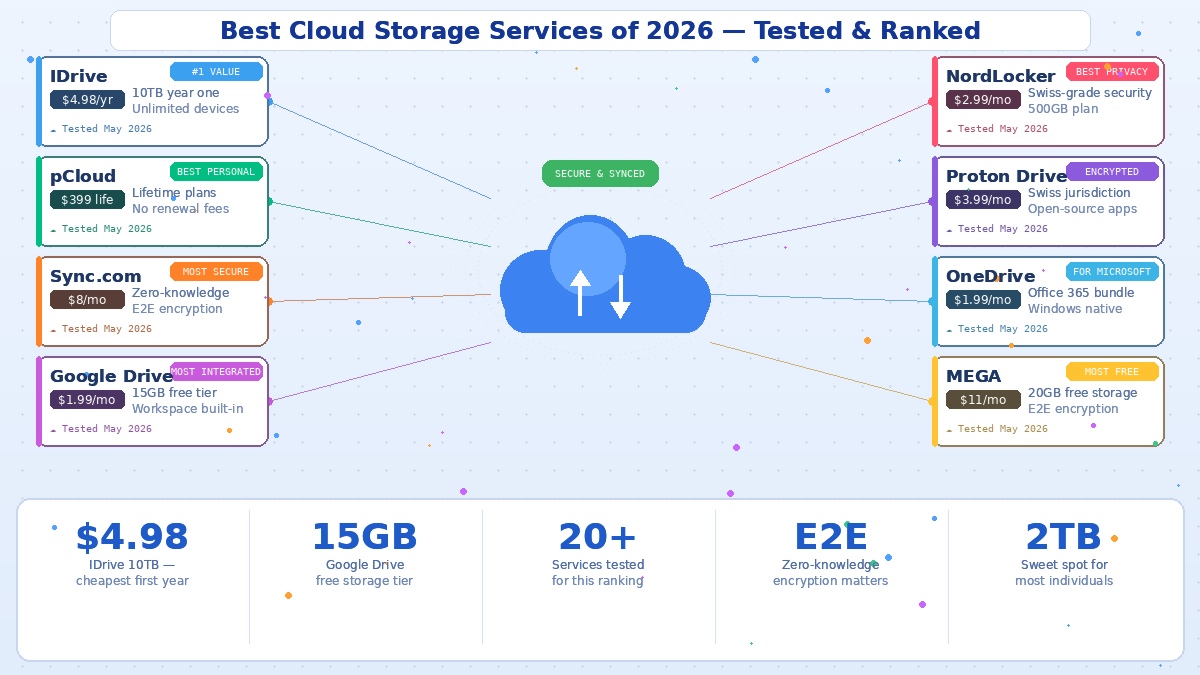
IDrive consistently ranks at the top, and the reason is simple: nobody else comes close on value. The headline offer — 10TB of storage for $4.98 in the first year — is unmatched in the industry. Beyond the price, IDrive supports unlimited devices on a single account, offers an extensive file versioning system, and works across Windows, macOS, Android, iOS, and the web. It’s genuinely a full backup solution rather than just a sync folder, which is something many competitors aren’t. The main caveat is that the dramatic first-year discount rises at renewal, so check the second-year price before committing — but even then, it remains competitive.
pCloud — Best for Lifetime Ownership
pCloud’s standout feature is something almost nobody else offers: lifetime plans. Instead of paying monthly or annually forever, you make a one-time payment and never deal with renewal fees again. The 2TB lifetime plan costs $399, and the 10TB plan is $1,190 — significant upfront, but if you do the maths over five or ten years, it works out far cheaper than perpetual subscriptions. It’s Swiss-based, fast, easy to use, and offers strong security with the optional pCloud Crypto add-on for client-side encryption. For anyone who hates recurring fees, pCloud is the obvious choice.
Sync.com — Best for Security
If your primary concern is keeping files genuinely private, Sync.com is the standout. It uses zero-knowledge architecture, which means even Sync’s own staff can’t view your file contents or recover them without your password. End-to-end encryption is applied to everything, both in transit and at rest. The interface is admittedly basic and third-party integrations are limited, but for anyone handling confidential documents — legal, medical, financial — that trade-off is well worth it. Plans range from 200GB to unlimited storage.
Google Drive — Best for Integration
Google Drive remains the default for hundreds of millions of people, and for good reason: if you already use Gmail, Google Docs, or Google Workspace, it works without you having to think about it. The 15GB free tier is generous, paid plans start at $1.99/month, and the real-time collaboration in Docs, Sheets, and Slides is still the best in the business. The downside is privacy — Google Drive uses server-side encryption, meaning Google holds the keys, and it’s tightly tied into Google’s ecosystem. It’s not a true backup solution either. But for everyday convenience and collaboration, nothing beats it.
NordLocker — Best for Affordable Privacy
From the team behind NordVPN, NordLocker combines strong security with genuinely affordable pricing. The 500GB plan costs $2.99/month and 2TB runs $6.99/month — significantly less than most privacy-focused competitors. All plans come with a 30-day refund policy, and the file encryption is robust. If you want strong security without the premium price tag of enterprise-focused tools, and you don’t need advanced collaboration features, NordLocker is one of the best deals available.
Proton Drive — Best for the Privacy Ecosystem
Proton Drive operates under Swiss privacy law, uses end-to-end encryption, and has open-source client apps that anyone can audit. The storage-per-dollar is lower than competitors — $3.99/month gets you 200GB, $9.99/month gets 500GB bundled with Proton’s VPN, Mail, Calendar, and Pass. But that ecosystem bundle is the point: if you already pay for Proton Unlimited for email or VPN, Drive comes included at no extra cost. Early 2026 brought 60% faster uploads on iOS and 70% faster downloads on the web, addressing the speed concerns that held it back previously.
Microsoft OneDrive — Best for Microsoft Users
If your life runs through Windows and Microsoft Office, OneDrive is the natural fit. It’s built into Windows, integrates seamlessly with Office 365, and the Microsoft 365 Personal plan bundles 1TB of storage with the full Office suite for a reasonable monthly price. Like Google Drive, it lacks end-to-end encryption and ties you into one ecosystem — but for Microsoft-centric users, that integration is exactly what makes it valuable.
MEGA — Best Free Tier
MEGA offers one of the most generous free plans available: 20GB of end-to-end encrypted storage at no cost. For users who just need to store and share files securely without paying, that’s hard to beat. Paid plans scale up significantly, and all storage is encrypted client-side. If you want maximum free space with real privacy protections, MEGA is the strongest option.
How to Choose the Right One
Start with what you actually need. For most individuals, the sweet spot is a 200GB to 2TB plan. For families and small teams, shared 2TB to 10TB plans usually deliver the best cost per user. For businesses, per-user pricing matters more than raw capacity because collaboration, compliance, and device management become part of the monthly cost.
Then prioritise. If privacy is paramount, choose zero-knowledge, end-to-end encrypted options like Sync.com, NordLocker, or Proton Drive. If collaboration and convenience matter most, Google Drive or OneDrive win. If you want maximum storage for minimum money, IDrive or a pCloud lifetime plan are unbeatable.
The cloud storage market has matured to the point where there’s a genuinely excellent option for every use case. The trick isn’t finding a good service — it’s matching the right one to how you actually work.
